

Environment Setup#
General information#
In Tudat, the physical environment is defined by a set of bodies, each encapsulated in a
Body object. Each body contains a list of properties
(gravity field, ephemeris, etc.), which may be interdependent.
Note
The Body object may represent a celestial body or an
artificial vehicle. Tudat makes no a priori distinction between the two: the distinction is made by the user when
creating the bodies.
The combination of all Body objects is stored in a
SystemOfBodies object (typically named
simple bodies in the code). This object constitutes “the environment” in Tudat.
During the propagation, all the required properties of bodies are extracted from here and combined
to evaluate accelerations/torques/guidance/…, and compute the state derivative of the system
(see Propagation Setup for details on how to do this).
Even though the primary role of the environment is in numerical state propagation, it is also used to define properties of celestial bodies in, for instance, (semi-)analytical trajectory design (see Multiple Gravity Assists Transfer).
There are many different types of environment models in Tudat (e.g. ephemerides, rotation models, atmosphere models, etc.). The full list of options for these can be found in the submodules of the environment setup module. The overall architecture of the environment in Tudat is described in more detail on a dedicated page on Environment - Overall Architecture (for advanced users and developers).
Body Creation - Procedure#
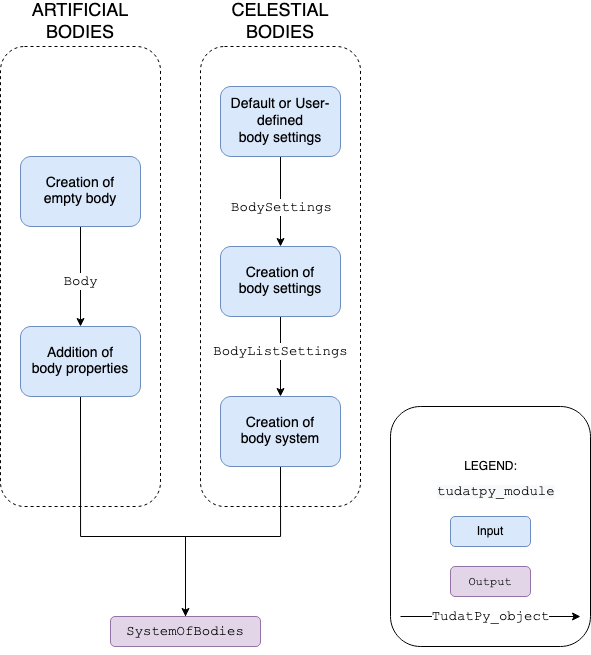
The Body objects, and the SystemOfBodies object
that holds them, are not directly created by the user. Instead, settings for each body
are created by a user and stored in a BodySettings object.
A set of such objects (one for each body) is in turn stored in a BodyListSettings object,
from which the environment is created using the create_system_of_bodies() function.
The typical procedure to create the environment is represented in the figure and explained below.
Create body settings: create settings for bodies which have default settings (see Default environment models), customize these settings as desired, and/or manually add settings for bodies without defaults (see Creating the bodies).
Create system of bodies: use the settings above to create a set of
Bodyobjects stored in aSystemOfBodiesobject, automatically resolving any interdependencies (see Creating system of bodies from settings).Modify bodies If desired, additional models and bodies can be added after this
Body/SystemOfBodiescreation, with limitations on interdependencies with existing bodies (see Adding bodies to an existing SystemOfBodies).
Body Utilization#
Although the Body objects contain all information on the environment,
the direct interaction with these objects in a simple numerical propagation is very limited. The bodies interact mostly
with the numerical simulation framework, which uses the information on the environment to set up and solve teh equations of motion.
In some cases, in particular when setting up a custom model, a user may need to interact with the simulation environment during the propagation. You can find details on how to extract information (states, orientations, altitude, etc.) from the simulation during the propagation in Interacting with the environment during propagation.
Many properties of the environment, either static quantities (e.g. gravitational parameter) or time-varying quantities (e.g. ephemerides) are also useful to extract outside of the scope of a numerical propagation.
Todo
Discuss how to extract information from the simulation environment outside a numerical propagation in more detail.